Static Code Analysis
Check one JavaScript, TypeScript or Python snippet for specific syntax and code patterns. See the rule behind each finding, then decide what to investigate in your project.
Babel parser 8.0.8 + 4 custom AST rules · Ruff 0.17.2 + 10 selected Python rules
Check results
Checks, rules and limits
Static checks cover selected patterns. Review the requirements, run independent tests in your own environment, and check the surrounding code.
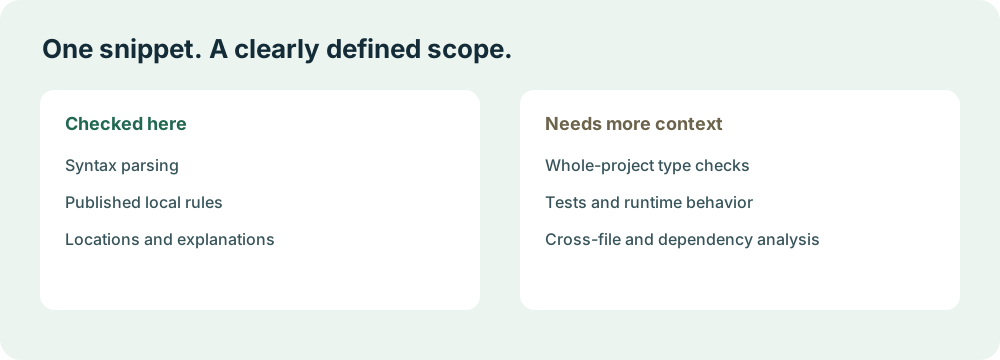
A completed check is not a correctness verdict. This tool parses one snippet without running it. It does not resolve imports, inspect a repository, run tests or establish that your code is secure.
From a snippet to a reviewable finding.
The code and report stay in this tab’s memory. The browser downloads trusted analysis engines; your submitted program is never executed.
Select the language
Choose JavaScript, TypeScript or Python. Paste a focused snippet or load the matching example. Keep the input within 20,480 UTF-8 bytes and 400 logical lines.
Run local analysis
A separate browser worker parses the input and applies the selected rules. Python downloads the official Ruff WebAssembly engine on first use, about 10 MB.
Read the evidence
A finding includes its rule, explanation and line and column. Parse errors show which later checks could not run. Zero findings has its own explicit status.
Review, edit and rerun
Check the surrounding context and intended behavior. Editing the input invalidates the previous report. Download a report locally or clear the editor and start again.
What static code analysis can tell you
Static analysis inspects a program’s structure without executing that program. A parser can identify invalid syntax; a rule can recognize a narrower pattern, such as an assignment used as an if condition. That is useful evidence for a review because the result has a defined scope and a location you can inspect.
Here, JavaScript and TypeScript are parsed into an abstract syntax tree with Babel, then inspected by four rules written for this checker. Python uses selected rules from the official Ruff WebAssembly package. These are different analysis engines with different coverage. The interface does not merge their names into a claim that every language receives the same checks.
A warning is a prompt to investigate. An assignment in a condition can be intentional. A Python name may be defined in a file omitted from the snippet. Conversely, a snippet with no warnings can still contain an incorrect formula, missing authorization, a false assumption about an API or a dependency problem that none of these rules evaluates.
The rules that actually run.
Rule lists are deliberately small and explicit. The report records the engine version and rule IDs. Comments that look like ESLint configuration do not configure the custom JavaScript rules.
JavaScript and TypeScript
Babel 8.0.8 checks parsing; custom rule set acv-ast-1 looks for the following patterns. TypeScript type syntax and JSX are accepted, but this is not a TypeScript type checker.
With TypeScript selected, the parser first tries TypeScript with JSX (TSX). If that fails, it retries TypeScript without JSX, so a valid angle-bracket assertion such as const result = <number>value; or a plain TypeScript generic arrow function is not rejected as unfinished JSX. The report’s limits record the successful parser mode. A snippet containing JSX should use value as Type assertions; mixing JSX with angle-bracket assertions does not form a valid single grammar.
| Rule | What it reports | Review limit |
|---|---|---|
acv/no-unreachable | Statements after an unconditional exit | Direct statements after return, throw, break or continue; not a whole-program reachability proof. |
acv/valid-typeof | Invalid string compared with typeof | String literals outside the defined typeof results; not general type inference. |
acv/no-condition-assignment | Assignment inside a condition | Assignments inside if and loop conditions; intentional assignments can also be reported. |
acv/no-duplicate-case | Duplicate literal switch cases | Repeated literal values in switch cases; expression equivalence is not evaluated. |
Python
Ruff 0.17.2 checks syntax and these ten selected rules. Ruff respects inline # noqa comments, which can suppress diagnostics. A clean report therefore does not mean every possible diagnostic was shown or that the snippet is correct.
| Rule | Pattern |
|---|---|
ruff/F601 | A dictionary repeats a literal key. |
ruff/F602 | A dictionary repeats the same variable as a key. |
ruff/F631 | An assert expression is a nonempty tuple, which is truthy. |
ruff/F632 | An identity comparison uses a literal where value comparison may be intended. |
ruff/F634 | An if condition is a nonempty tuple, which is truthy. |
ruff/F706 | A return statement appears outside a function. |
ruff/F707 | A bare except handler is not the final exception handler. |
ruff/F821 | A name is not defined in the supplied context. |
ruff/F822 | A name listed in __all__ is not defined. |
ruff/F823 | A local name is referenced before its assignment. |
Only the fixed selected rules are requested. Your Python is not imported or executed, dependencies are not installed, and no project configuration is loaded. Snippet-level name warnings need to be checked against the complete program.
Try a small, inspectable example.
The editor’s “Load example” button uses these same snippets. These demonstrate selected rules, not a benchmark or a count of real-world bugs.
JavaScript
function getLabel(value) {
  if (typeof value === "strng") {
    return value.trim();
  }
  return "Unknown";
  console.log("unreachable");
}
Expected: the misspelled typeof result and the statement after return are reported. Correct both and run a fresh check.
TypeScript
function isReady(count: number): boolean {
  if (count = 1) {
    return true;
  }
  return false;
}
Expected: assignment in the condition is reported. Replacing it with the intended comparison removes that warning; it does not prove the function meets its requirements.
Python
def greet(name):
    return greeting + name

print(greet("World"))
Expected: greeting is undefined in this snippet. Define it or review the surrounding context; no call to greet is executed by the checker.
Limits are part of the result.
Each check accepts one snippet of up to 20,480 UTF-8 bytes and 400 lines. It stops after 20 seconds, including engine loading. Cancel stops the worker; editing the code or changing languages also discards stale results. At most 100 findings are displayed.
The first Python check needs a roughly 10 MB analyzer download. A slow connection, browser restrictions or limited device memory can prevent it from completing. A load failure or timeout is shown as a failure, never an empty successful report.
Code is held only in the editor and analysis worker. Clear removes this checker’s input and report; reload or leaving the page discards unsaved work. JSON and Markdown downloads are files you choose to keep on your own device.
Read how the site handles code, hosting requests and optional analytics →
Questions about scope
Does this detect AI-written code?
No. It checks selected patterns in code written by a person or an AI. It does not infer the author, output an AI probability or provide a plagiarism verdict.
Is this a complete security scanner?
No. The published rules cover syntax and selected correctness patterns. We do not claim secrets detection, dependency scanning, cross-file taint tracking or a comprehensive security audit.
Can I paste an entire repository?
No. Only one pasted snippet is inspected. Imports, callers, configuration, other files and deployed versions are outside its view. Use project-level analysis and tests in your own environment for broader evidence.
Why can a valid snippet produce a warning?
A rule may lack surrounding definitions or recognize a pattern that you used intentionally. Read the rule and context. The assignment-condition rule, for example, flags both accidental and intentional assignments.
Why might Python produce no findings with noqa?
Ruff honors its inline suppression comments. A # noqa: F821 comment can suppress an undefined-name finding. The report makes this behavior explicit; no findings is not a guarantee that no issue exists.
Does TypeScript support include type checking?
No. Babel parses TypeScript syntax, and the four AST rules inspect structure. Imports are not resolved, a tsconfig is not loaded, and inferred or project-level types are not checked.
Does any AI model receive my snippet?
No. This release has no LLM review or code upload. The browser downloads static analyzer assets and processes your code locally.
Build the checks around the code.
How to verify AI-generated code
Put local diagnostics into a layered workflow with independent expectations and tests.
Read the guide →Code review checklist
Use a practical checklist for requirements, boundaries, permissions and release decisions.
Read the guide →Review Cursor and Claude Code changes
Give an independent reviewer the actual diff, requirements and relevant context.
Read the guide →Cross-file code review
Understand why one-file checks miss callers, contracts and unchanged dependencies.
Read the guide →Code verification in CI/CD
Move repeatable checks into your own controlled project environment.
Read the guide →Choose code verification tools
Compare kinds of evidence and coverage instead of treating every product as a proof engine.
Read the guide →Engine sources
The running versions are shown above. Engine documentation describes capabilities beyond those enabled here; our published rule list defines this tool’s scope.